Zajil Pen and AI
Zajil Pen writes the draft from the case file, analyses case files and reviews contracts
AI in Zajil works inside the screens staff already use: the Pen in the letter form, analysis on the case file page, and contract review on its own page. It gathers only what you can see, every number in the draft has a source, and anything without one stays a marked blank.
- It gathers only what you can see, and the model never touches the database
- Contract review against the legal references your institution enters
- Off until the institution turns it on with its own key
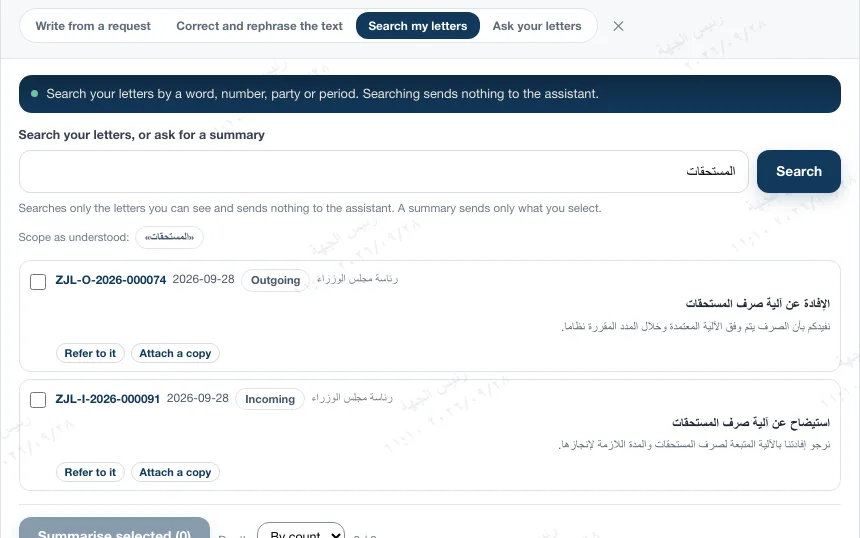
A real screen from the development environment: searching your letters sends nothing to the assistant
AI is not enabled on the public live demo. We show it to you in a session on demo data.
Inside the letter form
Try a request, and see how it writes from the case file
This panel replays what the Pen window does: it reads the letter type and the addressee, gathers the facts, picks the institution's pattern, then writes a draft in which every paragraph points to its facts. Hover over a paragraph to see its evidence.
What should the letter say?
- Letter type: outgoing letter
- Addressee read: Ministry of Finance
- A reply to letter ZJL-I-2026-000092; I will read its thread.
- Gathering the case file within your permissions…
- Found 2 letters to rely on and 7 facts
- Pattern: reply with approval · evidence coverage 100%
Case file
- F1Your incoming letterZJL-I-2026-000092
- F2Its date2026-09-01
- F3Its subjectRequest to extend the accounts settlement deadline
- F4Original deadline2026-09-15
- F5EntityMinistry of Finance
- F6Our first letterZJL-O-2026-000058
- F7New deadlineend of the month, from your request
SubjectApproval to extend the accounts settlement deadline
Greetings,
With reference to your letter No. ZJL-I-2026-000092 dated 2026-09-01 requesting an extension of the accounts settlement deadline set for 2026-09-15,
F1F2F3F4we inform you of our approval to extend the deadline to the end of the current month, provided the settlement is completed as set out in our letter No. ZJL-O-2026-000058.
F7F6Yours sincerely.
What I could not find:
Written by an AI model from the case file: a draft you review and complete before sending. Nothing is sent without your decision.
- Permissions before gatheringThe case file is built from the letters you can see and whose text you can read. A letter number outside your permissions gets the same reply whether it exists or not.
- A marked blank instead of a guessA letter number, date or figure with no support in the case file or your request becomes a blank such as [date], and is listed under "what I could not find".
- The institution's approved patternEach of nine purposes has a pattern the institution edits and approves; without an approved pattern it does not write. It does not learn a style from your past letters.
- Workarounds are refusedA request that tries to override the instructions or reach what you cannot see is refused before any call, and recorded in the audit log.
Voice dictation
You dictate, review the text, then decide where it goes
The "dictate" button sits in the request box, the question box and the letter editor toolbar. Nothing is sent to the AI model before you review the text.
- RecordUp to two minutes at a time. Arabic by default, English optional.
- TranscribeThe audio goes to the transcription service, or to an internal transcription server the institution owns. The audio is deleted after transcription.
- ReviewThe text appears for you to correct, especially the numbers. This step calls no language model.
- Use"Put it in the request" for the Pen to write from it, or "insert it into the body" directly.
This is what I heard. Correct anything misheard, especially numbers, then use it.
No language model is called in this step, and the audio is deleted after transcription.
Search my letters, ask your letters
An answer from your letters alone, with the numbers of the letters it came from
- Search sends nothing"Search my letters" searches the letters you can see inside the system, with no AI model. From the results you can reference a letter or attach a copy of it.
- A summary of what you chooseUp to eight letters in one summary, brief or detailed. Anything above the classification ceiling is marked "not sent to the assistant" and stays out.
- Ask your lettersIt sends excerpts from the six closest letters, and the answer comes from them alone. Any paragraph without a source is removed.
- No answer beats an invented oneIf it finds nothing it says: "I cannot find anything in your letters that answers this question."
Ask your letters
What is the latest we received from the Ministry of Finance about settling the accounts?
The latest is a letter dated 2026-09-27 asking to extend the accounts settlement deadline; it was routed to the Finance Directorate. L1
The letters I read
- L1ZJL-I-2026-000092Request to extend the accounts settlement deadline
What is next year's budget?
It searches the letters you can see, then sends excerpts from the closest ones to the assistant. Nothing above the classification ceiling is sent.
Case file analysis
The whole case file, read on one page
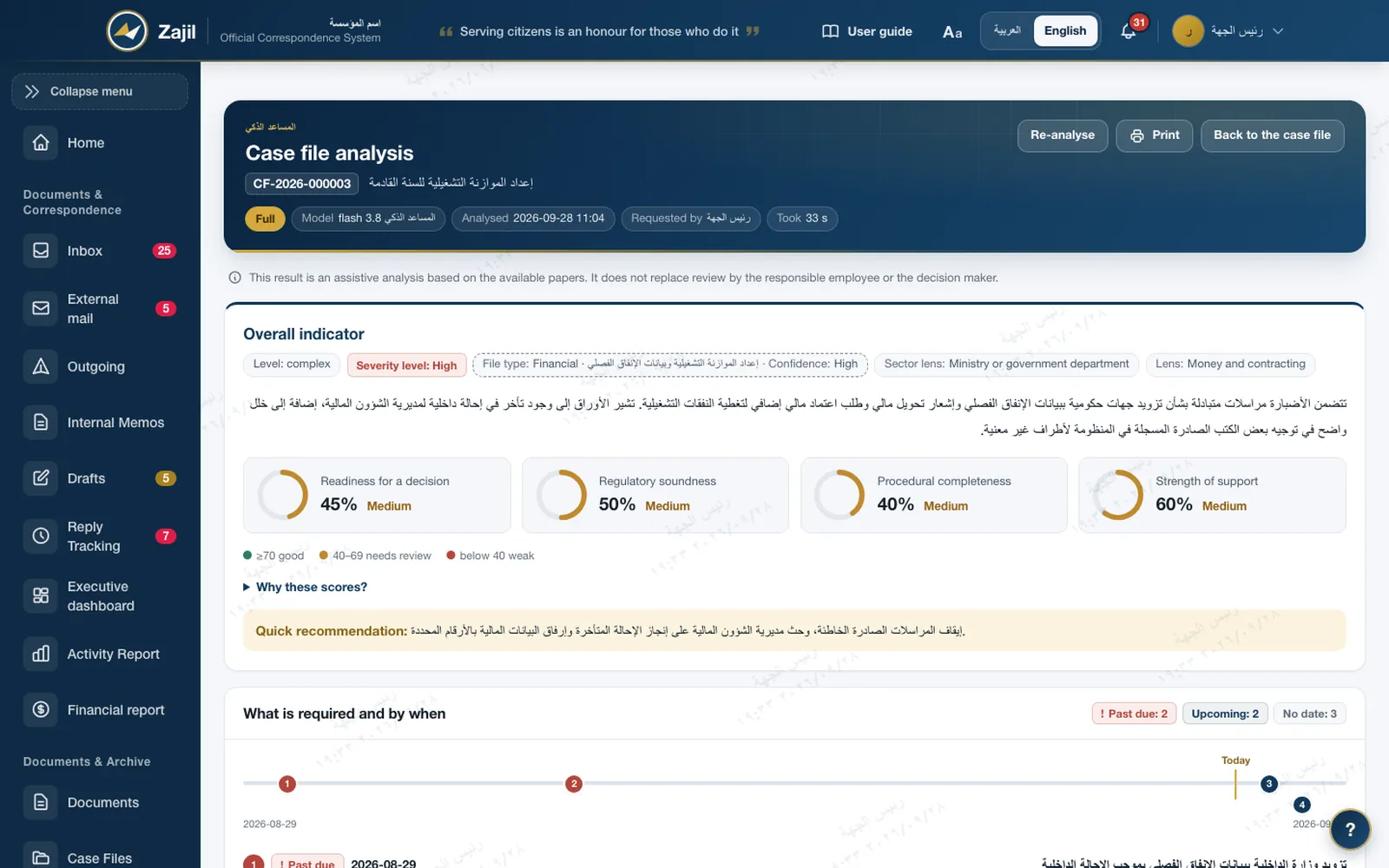
From the case file or letter page, Zajil gathers the texts, the readable attachments and the notes, sends them to the model, then shows the result in tabs.
- An overall indicator in four figuresReadiness for a decision, regulatory soundness, procedural completeness and strength of evidence, with the severity level and a quick recommendation.
- Tabs sized to the materialTakeaway, parties and roles, obligations, deadlines and decisions, facts, timeline, procedure review, gaps and contradictions, risks, and the case file tree. A tab with no material does not appear.
- Sector lensesTabs suited to the institution's sector, such as "Money and contracting", chosen by the administrator, up to eight lenses.
- It does not start without materialA case file with under 300 characters of text and no readable attachment is turned back with a clear reason, before any call to the model.
- An assistant, not a decision makerAbove every result: an assistive analysis based on the available papers, which does not replace review by the responsible employee or the decision maker.
Knowledge map
The case file at a glance: who wrote to whom, what is due, and where the defect is
The last analysis tab is an interactive map. Its skeleton comes from the system's own records, and the assistant adds what it inferred from the texts.
Knowledge mapCF-2026-000003
- CF-2026-000003Preparing the operating budget
- ZJL-O-2026-000071Request for additional funds
- ZJL-I-2026-000048Request for quarterly spending data
- ZJL-O-2026-000055Reply to the data request
- Ministry of Interior
- Finance Directorate
- Routing deadline 2026-08-29
- Coordination meeting minutes
- Risk of a late budget
- Correspondence routed wrongly
- Request for extra funds
- Company (sample)
- PartiesGovernment bodyOther partyInternal unit
- DocumentsCase fileLetterAttachment
- ObligationsRequest or obligationDeadline or date
- IssuesBreach or defectRisk
Node from the recordsNode inferred by the assistantAwaitingDefect or contradiction
- Records firstUp to 12 nodes and 16 lines from the system's records: the case file, its letters, parties, units and deadlines.
- Then what the assistant inferredUp to 15 nodes and 20 lines it adds from the texts, which one button hides so you see the records alone.
- Colours with a meaning19 node types. Red is for a breach or defect only, and amber for what is awaiting or overdue.
- Every node opens its detailsClick a node to see its details, and the map exports as a PNG image.
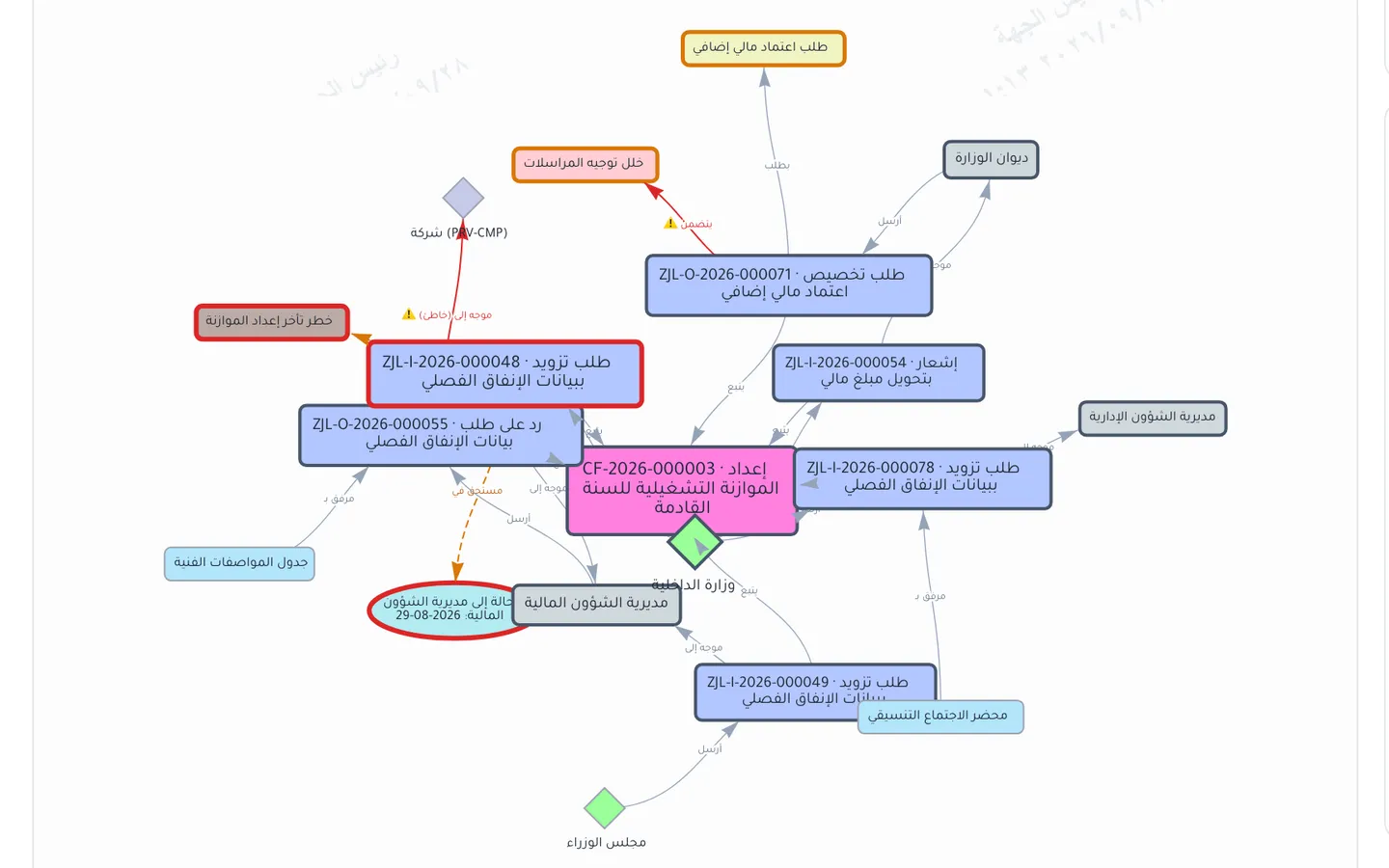
The map Zajil drew for the same case file in the development environment
Analysis levels
Analysis sized to the case file
The server picks the level before any call, from the size of the material alone, without opening the files to decide.
- 1No analysis neededOne short letter, and at most one small file
An instant card from the letter's records with no call to the model, and an "analyse anyway" button.
- 2BriefUp to 6,000 characters, three letters and three files
Short instructions, and a map built from the system's records alone.
- 3FullEverything else
Analysis with lenses suited to the institution's sector, up to eight chosen by the administrator.
Internal evaluation on the development environment · 2026-09-28 · 264 calls on test files
In a blind automated review against the answer key, the brief level was sufficient on all eight small files and preferred on six. On large case files it misses some risks, which is why the server chooses the full level for them. These are internal evaluation figures, not a certificate of accuracy.
Contract review
The contract is read clause by clause against your institution's legal references
- The contract files as they areThe contract, its annexes and technical specifications, as PDF or images, up to 8 files. You choose the contract type: administrative for the public sector, or civil.
- Your institution's legal referencesLaws, regulations and circulars the institution adds as text or PDF. No review runs without an active reference, and an article with no support in them is marked "needs verification".
- A result clause by clauseA compliance score out of 100 and a severity level, an estimate of the impact on public funds, then for each breach: the clause text, the article breached, the financial impact, the suggested correction and a confidence level.
- What the contract lacksMissing essential clauses with their basis, warnings and recommendations.
- Audit help, not legal adviceThe screen says so plainly: the result does not replace the competent legal adviser. Personal data is hidden before sending.
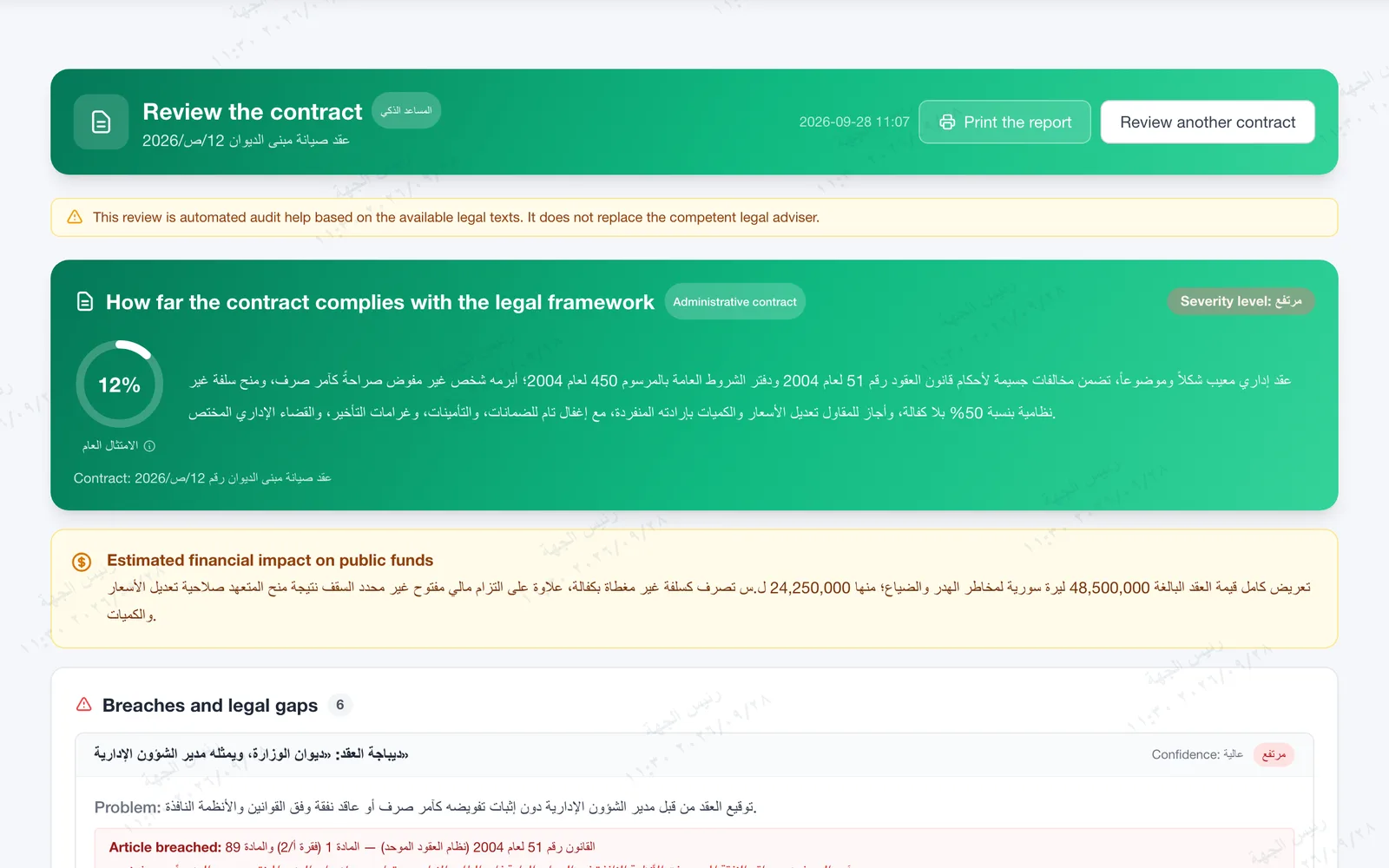
A sample contract we wrote for the demo, reviewed against legal references added in the development environment
Privacy
Personal data is hidden before it leaves, and restored in the reply
Every path to the provider goes through one redaction layer. Tokens are consistent within a request, and their table lives in memory only and is never stored.
In the letter
Request from citizen Samer Khalil, ID number 1098765432, phone 0944123456, in letter ZJL-I-2026-000105.
What goes to the provider
Request from citizen [شخص-1], ID number [هوية-1], phone [هاتف-1], in letter ZJL-I-2026-000105.
What comes back to you
The tokens return to their values in the reply before any part of the system sees it, and you are shown: "Personal data hidden before sending: 3".
Names are hidden when the letter's records know them, such as a citizen or an external party of type individual. Numbers are hidden by their patterns.
- What is hiddenNational ID and residency numbers, passports, bank accounts and IBAN, e-mail and phone, and the names of individuals and citizens linked to the letters.
- What staysLetter numbers and dates are not hidden, because the analysis needs them. Staff names stay unless the institution turns on hiding them.
- Limits we stateAn attachment sent in its original form (PDF or image) is not redacted and is governed by the classification ceiling. Audio is not redacted.
- The institution's keyThe institution enters the provider key itself, and it is stored encrypted. It can also route calls through a gateway it owns, set at deployment.
Controls
The institution decides when it works, and on what
Off until enabled
The assistant, the Pen and contract review are off by default, each feature has its own switch, and each staff member their own permission.
A classification ceiling
The highest level sent to the provider is "normal" by default, and nothing above it is sent.
A log without text
Every request is recorded: feature, model, staff member, time, token counts and what was hidden, without the request or reply text. Kept one year by default.
Limits per staff member
20 requests a minute and 300 a day, and 120 minutes of dictation a day, by default.
Human review
Every AI screen says the output is machine assistance that needs review before approval. The Pen neither sends nor approves.
Data subject rights
Requests for access, rectification and erasure sit in the security operations register when it is enabled, with rectification and erasure approved by two people.
Frequently asked
About Zajil Pen and AI
Is the draft always accurate?
We make no such promise. A number with no support becomes a marked blank, but the meaning and wording always need your review, and the system says so on every AI screen.
Is contract review legal advice?
No. Its result is automated audit help based on the legal texts the institution provides, and it does not replace the competent legal adviser.
Which model does it use?
Writing, summaries and analysis go through Google Gemini with a key the institution enters, and dictation through the Whisper service or an internal transcription server. There is no local language model yet.
Does it learn from our letters?
No. It writes to patterns the institution approves in the settings, and builds no style from past letters.
Is AI on the live demo?
No. AI is switched off on the public live demo. We show it to you in a session on demo data.
Does it work on mobile?
Not yet. The Pen, dictation, analysis and contract review are on the web only.

Get in touch
See the Pen, analysis and contract review on demo data
AI is not enabled on the public live demo. We show it to you in a session.