Operations and Integration
One bundle on the institution's servers, run, monitored and restored by its own team
Zajil arrives as a container bundle installed on one server inside the institution's network: the application, the database, the queues, the web server and backups. It comes with an installation guide, measured load figures, and a restore drill that proves the backup really comes back.
- On the institution's servers, with no internet connection needed after installation
- 2,000 staff on default settings, measured, not assumed
- A restore drill every month, with a measured restore time of 92 seconds
On your infrastructure
What runs on the institution's server, and what leaves it
One Docker Compose bundle. Images are built from source or loaded from a file, and fonts and libraries are part of it.
Who connects
- The browserIn Arabic or English
- The mobile appThrough the mobile gateway (BFF)
The institution's server
Leaves only if you set it
- The institution's mail server
- Keycloak
- Paired institutions
- Sentry
- SMS gateway
- AI provider
Without configuration nothing leaves the server.
- Deploy with one commanddeploy.sh builds the images, takes a verified backup before migrations, tags the previous image for rollback, then waits for readiness.
- Upgrades with rollbackA release is taken by its tag, not from the branch head. Indexes on large tables are built without locking writes, and --rollback restores the previous image.
- Secrets in one fileAn .env file with mode 600 or Docker secret files, and the system refuses to start with a placeholder value.
- Internal TLS when splitIf the database or Redis moves to another server: a ready TLS layer with full verification, and an unencrypted link is a warning at every start, or a refusal to start.
Installation
From an empty server to a working system
The steps as in the installation guide handed to the IT team, together with a troubleshooting runbook and a complete reference of environment variables.
- 1
Server and certificate
A Linux server with Docker, a domain and a TLS certificate, and a clock synced by NTP, because two-factor codes are time-based.
- 2
Release and secrets
A copy at a release tag, with secrets generated by a script into the environment file.
- 3
Deploy
The deploy command builds, migrates and waits, then /health/ready/ answers that the database and cache are healthy.
- 4
The first administrator
Turns on two-factor sign-in at once, and a second administrator is added, because resetting two-factor needs another administrator.
- 5
Identity and structure
Name, logo, letterhead and numbering prefix from settings, and the structure from a ready pack or a CSV file.
Sizing
The server by number of staff, with measured figures
Size follows who is on screen at the peak hour: about 10% of staff in a typical government institution.
Suggested server
- Up to 500 staff~504 cores · 8 GB · 100 GB SSDDefaultSuggested
- 2,000 staff~2008 cores · 16 GB · 250 GB SSDDefault: 4 workersMeasured
- 5,000 staff~50016 cores · 32 GB · 500 GB SSD12 workersExtrapolated
Measured: 2,000 staff
- 5,000 staff with 4 workers: a ceiling of 41.8 requests per second, with pages slower than the thresholds.
- 5,000 staff with 8 workers: 70 requests per second with no failures, and p95 between 2.4 and 4.2 seconds, above the thresholds.
- Hence the recommendation of 12 workers on 16 cores, or two application copies behind a load balancer. This is extrapolated from the two runs and not yet measured.
- The bottleneck is processingThe database used about one and a half cores and 40 connections at most. Capacity follows the number of workers and the cores behind them.
- Sign-in from one addressAn institution whose staff sit behind one NAT raises the per-address request limit; otherwise 1.6% of mass sign-in requests got a 429.
- Conservative figuresMeasured on one 16-core machine shared with the load generator, using the same production bundle.
- Repeat it on your serverThe same workday scenario ships with the bundle: inbox 40%, opening letters 30%, search 15%, and it fails if a threshold is crossed.
Backup and restore
A backup that has never been restored is not a backup
A daily backup of the database and attachments, verified, and no old copy is deleted before a sound new one exists. Once a month the latest backup is restored in an isolated bundle, checked, and torn down.
- Check the backup14 s
- Start the database10 s
- Restore43 s
- Migrations5 s
- Readiness10 s
- Smoke test10 s
- Isolated from productionA separate container project on an internal network with no egress and no background tasks, so it sends no mail and never touches the running system.
- The result in the Security CenterA "last restore drill" control and a line in the audit log. After more than 31 days, or if the drill fails, it becomes an alert.
- Protected backupsBackups encrypted to a public key, moved to another disk or external storage, with an alert on failure. Kept 14 days by default.
- Written limitsThe time does not include preparing a replacement server. With daily backups up to a working day can be lost; closer copies need WAL archiving outside the bundle.
Monitoring
The system says when it fails, and so does something outside it
Two health checks
/health/live/ for the process alone with no query, and /health/ready/ for the database and cache, answering 503 on failure.
An alert watchdog
A service outside the workers alerts when readiness drops or scheduling stops for five minutes, then reminds, then reports recovery.
Where the team works
E-mail, or a webhook address accepted by Slack, Mattermost, Rocket.Chat and Teams.
Prometheus metrics
Request time by route template, queue depth, scheduler heartbeat, database connections and the restore drill. No names and no search terms.
Sentry with scrubbing
Errors with the request number, without request bodies or identities. The system checks at every start that scrubbing really works.
Monitoring from outside
Uptime Kuma in the monitoring profile, and a script that checks TLS certificate expiry, scheduled weekly.
Single sign-on
Sign-in from Keycloak, permissions from Zajil
- One pathOpenID Connect with Keycloak for the web, and the mobile app through its gateway. Without configuration, local sign-in with a password stays.
- The ID token is really checkedThe signature against the realm's keys, the audience, issuer and expiry, and session values that cannot be used twice.
- A claim grants no privilegeNothing that comes from Keycloak gives a privileged account, a security clearance or approval authority. These are granted in Zajil alone.
- Two-factor sign-inAn institution policy: nobody, privileged accounts, or everyone. With single sign-on it is enforced in Keycloak and its status shows in the Security Center.
- Staff member
- Keycloak
- Zajil checks
- A session with Zajil roles
What is checked before a session opens
- The signature against the realm's keys, asymmetric algorithms only
- The audience is the client ID, the issuer is the realm
- Expiry and issue time
- The nonce and the state, never used twice
- The subject matches between the ID token and user info
- Matching by e-mail only when it is verified
Signing out revokes the refresh token at Keycloak.
Links between institutions
The letter reaches the other institution signed and encrypted, not by hand
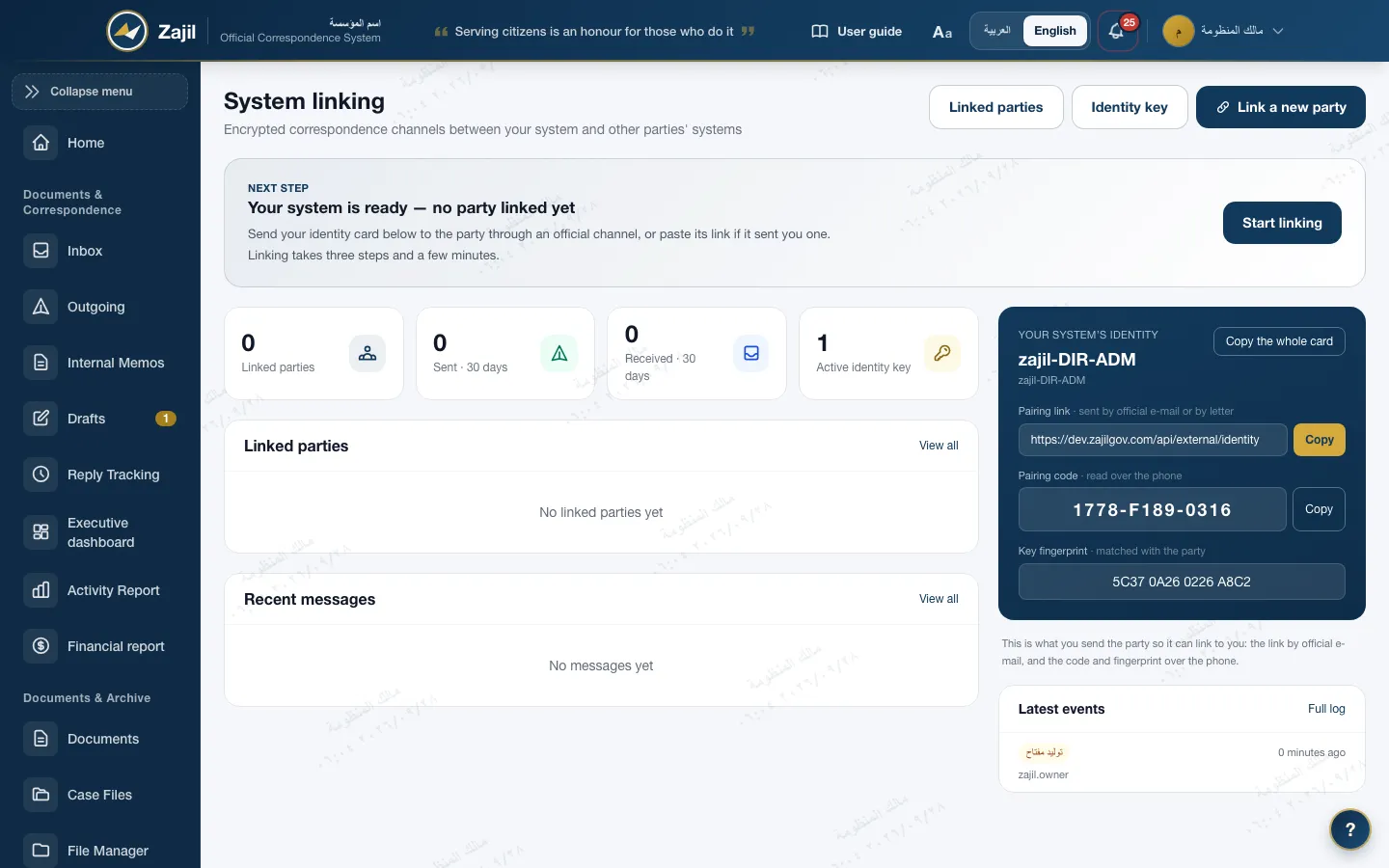
- Pairing the system verifiesThe institution sends its identity link by official mail, and the pairing code is read over the phone and matched on the server, along with the key fingerprint. A wrong code stops the pairing.
- Signed and encryptedEach institution has an RSA-3072 key, content is encrypted with AES-256-GCM, and every message is signed with the sending institution's key.
- No replay, no lossA replayed message is refused, an acknowledgement returns to the sender, and a received message is turned into an incoming letter once and only once.
- The private key stays out of the databaseIt is encrypted with a key that comes from the installation environment, and rotates to a new key that is never reused. Every step is in a link log.
Integration and data exchange
It connects to what the institution has, on its terms
Inbound e-mail
IMAP mailboxes over TLS, and Microsoft 365 through OAuth2. A message waits for sorting, then is registered as an incoming letter.
Inbound e-mail in CorrespondenceIntegration sources
An external system, such as a complaints platform, sends its requests with a service-account token; they become drafts in a set unit, without duplicates, and every receipt is logged.
A documented API
REST with an OpenAPI specification, whose documentation is for the system administrator only. Its search normalizes Arabic like the interface.
External archive
An existing Paperless server at the institution appears as a tab in the archive center for those allowed, and can be attached from to a letter.
Document scanners
A Windows scan agent, and a watched folder for network scanners: the file becomes a letter, and a duplicate is recognised by its fingerprint.
Scanning in the ArchiveA guard for the internal network
Outbound connections go to the address that was checked, and internal addresses are refused unless explicitly allowed in configuration.
The system administrator
The administrator manages but does not read
- One line in the installation settingsWith ADMIN_CONTENT_POLICY=break_glass the administrator is treated at the edge of a letter like any staff member in the same position, and keeps what is needed to manage.
- In the environment, not the databaseThe administrator edits database settings on screen, so a restriction kept there could be switched off silently. The environment is changed by the operator.
- A live grant for one letterReading a given letter needs a grant with a written reason, for that letter alone, which expires by itself and is recorded in the log.
- Side doors are closedThe Django admin panel is closed under this policy, and reports give counts without content.
Manages
- Accounts, roles and permissions
- Settings, structure and templates
- Mailboxes and integration
- A letter's envelope, without its subject or body
Does not read
- The body of letters and their attachments, without a grant
- Letters beyond their own position, in lists and search
- Whatever surrounds a granted letter: links, case file, reply
- The Django admin panel
Break-glass grant
- Scope
- One letter
- Reason
- Written, required
- Duration
- 30 minutes by default, up to 60
- Trace
- Every read in the log
Frequently asked
About Operations and Integration
Does Zajil work without the internet?
Yes, after installation. Images are built from source or loaded from a file, and nothing leaves the server except what the institution configures: mail, SMS, Sentry, AI, or links between institutions.
How many staff can one server carry?
2,000 staff on default settings in a real measurement, within every threshold. For 5,000 staff we recommend 12 workers on 16 cores; this is extrapolated from two runs and not yet measured.
How long does recovery take after a failure?
In the measured drill, 92 seconds from start until the system answers, for a backup holding 200,000 letters. Add the time to prepare a replacement server and move the backup if the server itself failed.
How do we know a release is sound before installing it?
Every build runs more than 7,000 tests in six parallel shards, a browser check and a health check, with dependencies pinned by their hashes. The build has no secrets and deploys nothing.
Do we need Keycloak?
No. Without configuration, local sign-in with a password and two-factor sign-in works. Keycloak is optional for an institution that already has single sign-on.

Get in touch
We plan the installation with you
We review the server, the network, the number of staff and the integrations you need before starting, and hand your team the installation guide and the troubleshooting runbook.